ContentsHow formulas work
How formulas work
Field keys and operators, unit checks, temperatures, tests and choices, linked records, reference tables, your own functions and curves, each with an example.
A Calculated field works out its value from other fields, so nobody types it and it never goes stale: change an input, and every record that uses it recomputes. This page is the reference for what a formula can say. Each section explains one idea, then works an example; click Try it on one to change its inputs and watch the result follow. For a first formula step by step, see Give fields units and write your first formula.
Admin and Engineering members write formulas. Anyone can read one: hover the small ƒ beside a calculated value in the grid.
On this page: Write a formula · Units · Units SpecLatch can't store · Temperatures · Tests and choices · Linked records · Reference tables · Your own functions · Curves · Blank results · Math functions
Write a formula
A formula is ordinary math written with field keys. A key is a field's short code name, such as cv_rated: lowercase letters, digits and underscores. You rarely type one in full, because the editor finds fields by name.
- Type
+and-to add and subtract,*to multiply,/to divide and^for a power. - Type part of a field's name and pick it from the list; its key goes into the formula. Ctrl+Space opens the list.
- Insert lists your fields, your functions, the reference tables and the math functions.
- Spaces and line breaks don't matter, so a long formula can take several lines.
- Write
0.5, not.5, and1500, not1,500. ^comes first, then*and/, then+and-. A minus sign in front of a value applies before^, so-2 ^ 2is 4; write-(2 ^ 2)for −4.
A formula reads Number, Choice, Yes / no, Calculated and From linked records fields. It can't read text, dates, files, a choice that allows several values, or its own field.
The checker runs as you type. When the formula is sound, the line under the editor says what it returns, such as Returns a plain number; otherwise a red message names the problem and how to fix it. Click Preview on real records to see results before you save.
cv_rated=80cv_rated * 0.865
Cv and Kv are both plain numbers, so the result is one too.
Units
Formulas check units the way an engineer does on paper. SpecLatch converts every value to a common base before the math, so feet and inches mix freely, and it refuses a formula that adds a length to a pressure. A wrong formula fails in the editor, not as a wrong number on a spec sheet.
+,-and comparisons need the same kind of value on both sides, such as two lengths.- In a sum or a comparison, a plain number needs a unit first:
qty(100, "ft/min"). *and/combine kinds, and two values of the same kind divide to a plain number.- Kinds may combine along the way, but the result must be a plain number or a single kind, such as a flow or a pressure.
^takes plain numbers only.
cap_100fpm_50pcf=50 TPHmax_belt_speed=500 ft/mincap_100fpm_50pcf * (max_belt_speed / qty(100, "ft/min"))
The two speeds divide to a plain 5, so the result keeps the capacity's kind.
max_belt_speed=300 ft/min→150 TPHThe line under the editor reads Returns Mass flow (capacity) · stored in, then a unit you can change. Write / 100 instead and the formula doesn't save: 100 has no unit, so the speeds don't cancel.
Units SpecLatch can't store
Many engineering formulas carry a constant that assumes particular units, such as the 3,960 in hydraulic power, which is right only for gpm and feet. Their in-between units, such as flow times head, are also nothing a field can store. For those, read each value as a plain number in the unit the constant expects, do the math, then give the result its unit:
num(bep_flow, "GPM")reads the flow as a plain number of gallons per minute, whatever unit the field stores.qty(…, "HP")turns a plain result into a power.num()takes a value that has a unit;qty()takes a plain number.- Name units as the unit picker shows them, such as
"in","ft","psi","GPM","HP"or"m³/h". Capitals don't matter, and"m3/h"works too.
Because the units sit in the formula, anyone reading it sees what the constant assumes.
bep_flow=130 GPMbep_head=132.6 ftsg=1qty(num(bep_flow, "GPM") * num(bep_head, "ft") * sg / 3960, "HP")
sg is the specific gravity. Give the flow in m³/h and the result is still right, because num() reads it in gpm before the constant applies.
Written as bep_flow * bep_head * sg / 3960, it doesn't save: the message says the result would be flow × length, a compound unit SpecLatch can't store. A per-unit result, such as 1 / rated_speed, needs num() too.
Temperatures
A temperature reading and a step on the scale convert differently: 70 °F is 21 °C, but a 10 °F rise is a 5.6 °C rise. Mixing them up gives wrong spans and accuracies, so SpecLatch keeps the two apart:
- Subtracting two temperatures gives a temperature difference, in Δ°F or Δ°C.
- A temperature plus or minus a difference is a temperature.
- A difference scales like any value. A temperature can't be scaled, negated or added to a plain number, so
range_max * 2andrange_max + 10don't save. min(),max(), comparisons andnum()work on temperatures.- Write a difference in a formula as
qty(10, "Δ°F")orqty(10, "delta °F").
Store spans, accuracies and rises in a unit from the Temperature difference group of the unit picker, so they convert correctly.
range_min=0 °Frange_max=250 °Frange_max - range_min
Two temperatures subtract to a difference, which converts as a step on the scale: 250 Δ°F is 139 Δ°C, not the 121 °C that a reading of 250 °F is.
A second field then adds half a span above the scale: range_max + span * 0.5 gives 375 °F (191 °C).
Tests and choices
A formula can decide as well as compute: compare values, test a yes/no field, and return a label such as Non-overloading instead of a number.
- Compare with
<,<=,>,>=,=and<>. The forms==,!=,≤,≥and≠work too. - Compare like with like, and give a threshold its unit:
range_max <= qty(1000, "psi"). Units convert first, so 1 in equals 25.4 mm. - Compare a choice field to one of its labels in quotes:
magnet_material = "Samarium-cobalt (SmCo)". Labels match exactly, capitals included, and compare with=or<>only. - A Yes / no field is a test by itself:
if(stock_item, …). - Combine tests with
and(),or()andnot();&,|and!aren't operators. - Comparisons don't chain: write
and(ratio > 0.4, ratio < 0.8), not0.4 < ratio < 0.8. if(test, then, else)gives one of two values. Add test and value pairs for bands; the first true test wins.- Only the branch taken needs its inputs, and every branch gives the same kind of value.
- A choice whose labels are all numbers, such as 2, 4 and 6, also reads as a plain number.
A formula that returns a label in quotes on every branch is a choice. The line under the editor then says Returns a choice: and lists the labels in the order the formula writes them, and the result filters and prints like a Choice field.
max_bhp=5.22 HPstd_motor_hp=5 HPstd_motor_sf=1.15if(max_bhp <= std_motor_hp, "Non-overloading", max_bhp <= std_motor_hp * std_motor_sf, "Into the service factor", "Overloads the motor")
max_bhp is the power at the end of the curve and std_motor_sf the motor's service factor. 5.22 HP is above 5 HP but within 5 × 1.15 = 5.75 HP, so the second test is the first true one.
max_bhp=4.8 HP→Non-overloading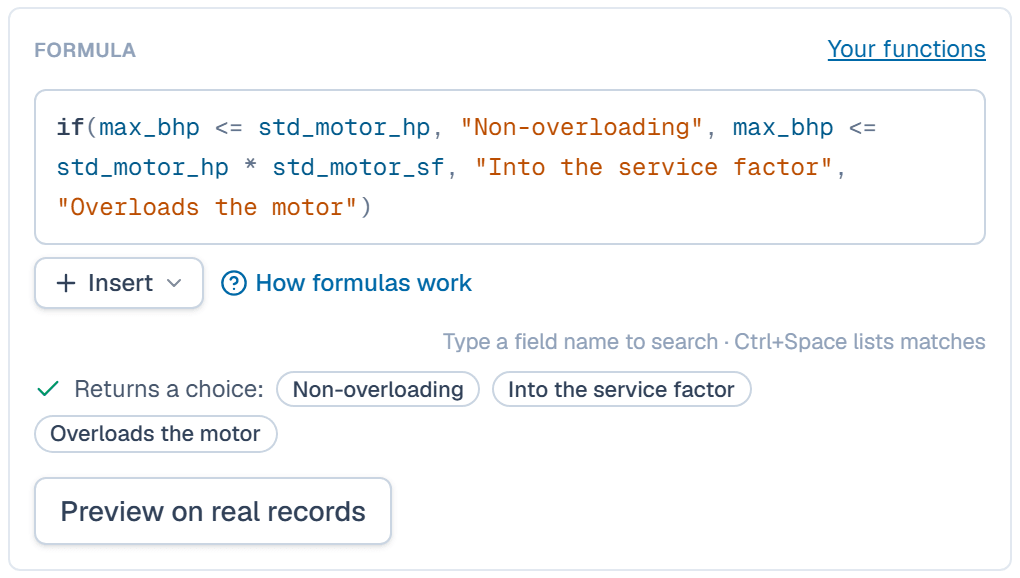
Linked records
A From linked records field brings values over a link, as a lookup or a rollup. A formula reads it like any field of its own table, so specs that live on a linked record never need retyping:
- A lookup set to Each value or Unique values of a number field reads that number, in the source field's unit. If the linked records hold different values, the result stays blank and says why: use a rollup to combine them.
- A rollup set to Sum, Average, Lowest or Highest reads the combined number, in the rollup's Show in unit. Count reads as a plain number.
- Range (lowest–highest) gives two numbers, so a formula can't read it.
- When a linked record changes, the formula recomputes.
The motor check above already reads two linked values: std_motor_hp and std_motor_sf come from the pump's linked motor.
std_actuator_torque=450 in·lbrequired_torque=429 in·lbround(std_actuator_torque / required_torque, 2)
std_actuator_torque is looked up from the linked actuator. The two torques divide to a plain number: a margin of 1.05.
required_torque is itself calculated, 330 in·lb of breakaway torque × a 1.3 sizing factor: a formula can read another calculated field.
Reference tables
Values from a chart or a standard, such as a valve's flow by opening angle, live on Reference tables, shared by every table. A formula reads one with lookup(table, x):
- Pass the table's key, then its inputs in order. A number input needs the right kind, such as
qty(45, "°")for an angle. - A choice input picks rows by exact label.
- Between two rows, the value is read on a straight line.
- Outside the rows, the result stays blank with the reason, because SpecLatch doesn't extrapolate.
- When a table has several output columns, name one in quotes last:
lookup(steel, t, "modulus"). - Editing a reference table recomputes every formula that reads it.
cv_rated=380cv_rated * lookup(ball_characteristic, qty(45, "°")) / 100
The table lists the percent of rated Cv by opening: 5 % at 40° and 8 % at 50°. At 45° the lookup reads 6.5 %, halfway between.
Your own functions
When the same math appears in several fields, name it once on Functions, then call it from any formula by its key. A correction to the function then reaches every record that uses it.
- Pass the values in the function's input order. Each one is checked against its input's kind, in any unit of that kind.
- A call with the wrong number of values doesn't save, and the message lists the inputs.
- Editing a function recomputes every formula that calls it.
- A function can't call another function or read a reference table. Pass that value in as an input instead.
bep_flow=130 GPMbep_head=132.6 fthydraulic_power(bep_flow, bep_head, 1)
The function was defined once as hydraulic_power(flow, head, sg); the 1 is the specific gravity of water. Swap flow and head and the formula doesn't save, because the function's flow input refuses a length.
Define a reusable function shows how to create one.
Curves
A data series can draw calculated lines on every record, from that record's own values, so a curve you can work out never needs typing. Open Fields, click Add series or Edit series under Data series (curves), then Add line under Calculated lines:
- Formula of x draws y from
x, the series' X axis. x runs evenly between two values, through a list, or through a reference table's rows. - From another curve redraws each point of a curve on the same record. Its new x = and new y = formulas read
xandy. - Line formulas can read the record's fields,
lookup()and your functions. - Preview on records draws the lines on real records before you save.
A series holds up to 10 calculated lines, of up to 200 points each.
cap_100fpm_50pcf=50 TPHx=300 ft/mincap_100fpm_50pcf * x / qty(100, "ft/min")
This is the y formula of a line on a capacity series, belt speed on X. With x running evenly from 100 to max_belt_speed = 500 ft/min in 6 points, the line goes from 50 TPH to 250 TPH.
x=500 ft/min→250 TPHPerformance curves covers series and lines in full.
Blank results
When the math can't finish, a calculated value stays blank rather than showing a guess. In the grid, a blank calculated cell shows a dash and a small ƒ; hover it to see the formula and why it's blank. Preview on real records shows the same reasons before you save.
Common reasons:
- An input is empty.
- A division by zero, or the square root of a negative number.
- A lookup outside the reference table's rows.
- A linked field whose records hold different values.
bep_flow=130 GPMbep_head=emptyhydraulic_power(bep_flow, bep_head, 1)
The reason names the field the way the grid does. Type a head in Try it and the power appears.
Math functions
Beside the operators, every formula can call the built-in functions below. Built-in functions, with examples works through each family.
| if(test, then, else) | The value of "then" when the test is true, else the last value, e.g. if(pressure > qty(1000, "psi"), 1.5, 2). Add pairs for bands: if(r < 0.4, "Pass", r < 0.8, "Check", "Fail") — the first true test wins. Tests compare with < <= > >= = <>; a choice compares to a label in quotes (material = "316 SS"). |
| and(test, test, …) | True when every test is true. |
| or(test, test, …) | True when at least one test is true. |
| not(test) | True when the test is false, e.g. not(ul_listed) for a Yes/No property. |
| lookup(table, x) | Reads a reference table (Data model → Reference tables): lookup(allowable_stress, temperature) interpolates between rows; lookup(flange_rating, flange_class, temperature) matches the choice first. Name the column in quotes when the table has several: lookup(steel, t, "modulus"). Outside the rows the value is blank. |
| num(x, "in") | Reads a unit-aware value as a plain number in the unit you name. Use it for formulas whose units can't be stored, like areas or empirical constants. |
| qty(x, "ft") | Gives a plain number a unit, so the result can be stored as a length, a flow, a pressure… |
| min(a, b, …) | The smallest value. All values must be the same kind. |
| max(a, b, …) | The largest value. All values must be the same kind. |
| coalesce(a, b, …) | The first value that isn't blank, e.g. min(p_well, coalesce(p_flange, p_well)) when only some records have a flange. All values must be the same kind. |
| abs(x) | Absolute value. Keeps the unit. |
| interpolate(x, x1, y1, x2, y2) | Straight line through (x1, y1) and (x2, y2), read at x. The x values share a kind, the y values share a kind. |
| round(x, digits) | Rounds a plain number to a number of decimals (0 if omitted; −1 rounds to tens). |
| ceil(x, step) | Rounds a plain number UP to a multiple of step (1 if omitted), e.g. the next standard size. |
| floor(x, step) | Rounds a plain number DOWN to a multiple of step (1 if omitted). |
| sqrt(x) | Square root of a plain number. |
| sin(angle) | Sine. The angle is in degrees: a plain number or an angle field. |
| cos(angle) | Cosine, angle in degrees. |
| tan(angle) | Tangent, angle in degrees. |
| asin(x) | Arcsine, in degrees. |
| acos(x) | Arccosine, in degrees. |
| atan(x) | Arctangent, in degrees (e.g. an incline from rise ÷ run). |
| pi() | π = 3.14159… |
Related
| Reference | Built-in functions, with examples |
| How-to | Give fields units and write your first formula |
| How-to | Define a reusable function |
| How-to | Link two tables, add lookups and rollups |