ContentsWhat each role can see and do
What each role can see and do
The four roles and the visibility setting: who edits, submits, approves, builds the data model and runs the workspace, and which fields each member sees.
Every member of a workspace has two settings: a role, which decides what they can do, and a visibility, which decides which fields and documents they can read. Chosen together, they let an engineer record costs that sales doesn't see, and let a reviewer publish records without being able to change a spec. Read this when you add someone to the workspace, or when a teammate can't find a button or a field that you can see.
As a starting point:
- The few people who look after the workspace, its members and its plan: Admin.
- The people who own the specs and build the tables: Engineering.
- The people who check what customers will see, publish it and make the documents: Marketing.
- Everyone who only looks things up, such as sales and support: Viewer. They take no editor seat.
Each section below stands on its own:
- Role and visibility
- Running the workspace
- Owning the specs
- Reviewing and publishing
- Reading only
- Setting a member's role and visibility
- Who can do what, by task
Role and visibility
The two settings answer different questions, so they are set separately.
- The role is what a member can do: edit records, send them for review, approve them, build tables or manage the workspace.
- The visibility is the highest tier a member can read: Public, Internal or Confidential. Every field has one of these tiers, and so does every document and every curve. A member sees what sits at or below their visibility, so fields above it are left out of their grid, their record pages and the spec sheets they generate.
Because the settings are separate, they combine freely. An Engineering member at Internal edits specs but doesn't see the Confidential cost fields, while a Viewer in purchasing at Confidential reads those costs but can't change them. Visibility also sets what an Admin sees in the grid, but it doesn't hold an Admin back, because that role can change anyone's visibility, its own included.
Field tier against each reader · the portal shows Published records only
| Field tier | Portal & Public API keys | Member at Internal | Member at Confidential |
|---|---|---|---|
| Public | ✓ | ✓ | ✓ |
| Internal | — | ✓ | ✓ |
| Confidential | — | — | ✓ |
Two more rules hold whatever the role:
- A member at Public visibility sees only Published records, so drafts and records in review stay out of their grid and their review queue.
- Only Draft records accept edits. To change a Published record, someone returns it to Draft first, as Send a record for review, approve, publish explains.
Running the workspace
Admin can do everything the other three roles can, plus the settings that change the workspace for everyone, so give it to the few people who look after it. A workspace always keeps one: its last Admin can't be moved to another role.
Only the Admin role can:
- Change members' roles and visibility, and invite or remove members, on Members.
- Choose the plan on Billing, and export the whole workspace from the same page, as Export your whole organization describes.
- Set up Automations, AI assists and API keys.
- Set the logo, colors and data validation on Branding. On the Growth plan and up, also set up the Portal: whether it's live, which tables appear in its catalog and which records are featured.
- Make a field more visible once records hold data in it, such as Internal to Public. Who can make a field more visible has the details.
- Delete a table, once it holds no records.
- Delete records forever from Trash, or empty it.
- Import records as Published, because that both submits and approves them.
Owning the specs
Engineering is for the people who keep the product data right, such as design engineers and product managers. They fill in and correct the specs, then hand finished records to review. An Engineering member can:
- Add and duplicate records, and edit Draft ones, their files and curves included.
- Move records to the trash, and restore them from Trash.
- Import a spreadsheet, or paste rows from one into the grid.
- Click Submit for review on a finished record, and Return to draft on a Published record that needs a change.
- Upload, edit and delete files on Documents, and set up Document categories.
- Generate spec sheets and catalogs, and work on Templates, Tags and, on the Growth plan and up, Translations.
- Build the data model: create tables, add and change fields and curve series on Fields, and create functions and reference tables. Saving views that the whole team shares comes with it.
Building the data model also needs Confidential visibility, because fields, formulas and their previews read the values of every field. An Engineering member at a lower visibility keeps every other right on this list, and Fields tells them to ask an Admin for Confidential.
An Engineering member can't approve records, so a Marketing or Admin member publishes what they submit. They also can't make a field that holds data more visible, or delete a table.
Reviewing and publishing
Marketing is for the people who decide what reaches customers and how it looks. They check records, publish them and make the documents, while the specs themselves stay with Engineering. A Marketing member can:
- Open Needs review, then approve a record, which publishes it, or reject it with a comment.
- Click Return to draft on a Published record that needs a change, so that someone who edits specs can correct it.
- Generate spec sheets and catalogs, design them on Templates, and manage Tags and tag records.
- On the Growth plan and up, manage Translations, and handle the questions customers send from the portal on Inquiries, replying from their own mail and marking each one handled.
A Marketing member can't edit values, add or import records, or send records for review. They also can't upload to Documents, or change the portal's setup and branding.
Reading only
Viewer is for everyone who needs the product data but doesn't change it, such as sales, support or production. These members take no editor seat, so the plan's seats go to the people who edit. A Viewer member can:
- Browse tables and records, filter and sort them, save views for themselves, and copy cells into a spreadsheet.
- Comment on records and mention teammates.
- Open the spec sheets and catalogs that others have generated, and download files from Documents, within their visibility.
- Use the calculator on Functions and read Reference tables.
Everything else is closed to them: no edits, no review actions, and no settings besides the member list. Needs review isn't in their sidebar, but the grid still shows each record's status. When a record has no spec sheet yet, its Spec sheet button stays grey until an editor generates one.
Setting a member's role and visibility
An Admin sets both on Members. Each member's row has a Role list and a Visibility list, and a change saves as soon as you pick it. The Permissions column sums up what the role can do. Members with any other role see the same page, read-only.
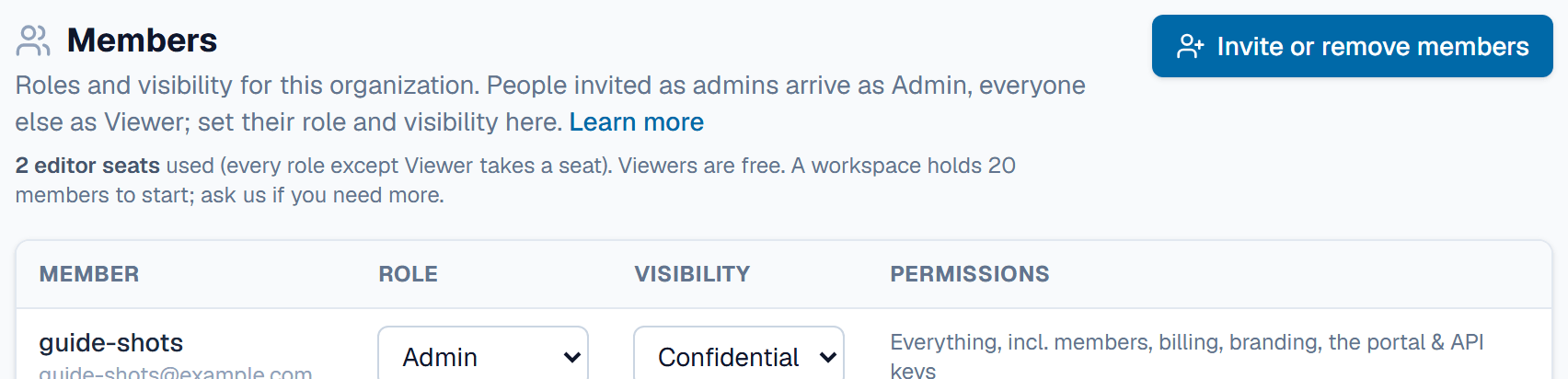
Keep these in mind when you set them:
- People who accept an invitation join as Viewer with Internal visibility, unless the invitation itself made them an administrator and an editor seat is free.
- A new role keeps the visibility the member already had. When you make someone Engineering so they can build tables, set their visibility to Confidential as well.
- Every role except Viewer takes an editor seat, counted under the page title. When every seat is taken, giving a Viewer another role needs a seat freed up or a larger plan.
- The workspace's last Admin can't be given another role.
To invite someone, see the FAQ in Members, settings & billing.
Who can do what, by task
Moving a record through review, from the app's own rules:
Review statuses · who can move a record
Everything else:
- Read records, comment, save views for yourself, and open generated spec sheets and catalogs: every role, within its visibility.
- Add, duplicate, trash and restore records, edit Draft records with their files and curves, and import or paste: Admin, Engineering.
- Upload files to Documents: Admin, Engineering.
- Generate spec sheets and catalogs, and work on templates, tags and translations: Admin, Engineering, Marketing.
- Handle portal inquiries, on the Growth plan and up: Admin, Marketing.
- Build tables, fields, functions and reference tables, and save shared views: Admin, and Engineering at Confidential visibility.
- Make a field that holds data more visible, delete a table, and delete records forever: Admin.
- Members, billing, automations, AI assists, API keys, the portal, branding and the whole-workspace export: Admin.
Related
| How-to | Set a field's confidentiality tier |
| How-to | Send a record for review, approve, publish |
| Concept | Confidentiality & review |
| Concept | Members, settings & billing |