ContentsPortal & API
Portal & API
Share your approved catalog: a portal site with an inquiry form, plus a read-only API and MCP server for other systems.
What to know first
The portal shows one slice
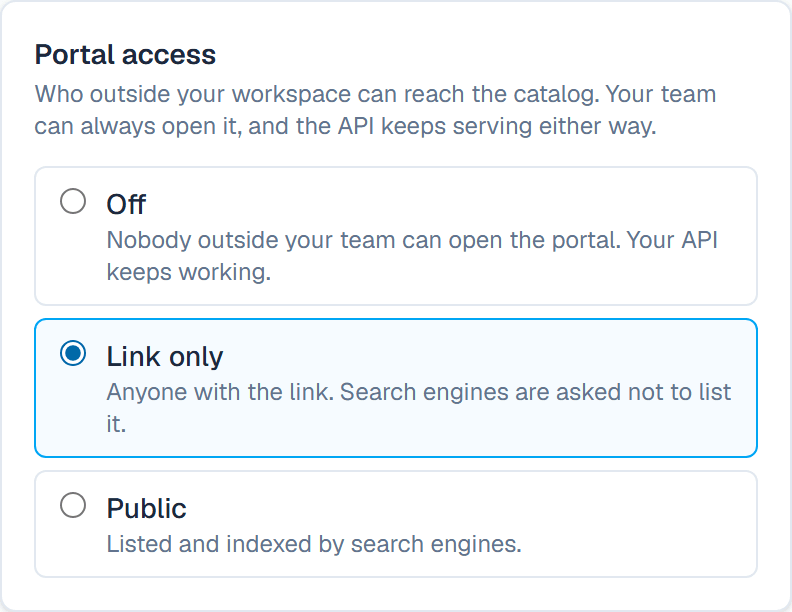
Three access levels
Inquiries land in SpecLatch
A read-only API
AI assistants through MCP
In this topic
- How-toTurn the portal on and choose what customers seeDecide who can reach your catalog site, which tables and products it shows, and which fields sum up each product.6 min
- How-toReceive and answer inquiriesLet portal visitors send you a message about a product, get notified when one arrives, and answer it from your own mail.4 min
- How-toCreate an API key; connect an AI assistantGive a website, a script or an AI assistant its own read-only key, choose how much of your catalog it sees, and connect an assistant over MCP.5 min
Where you see it
- Portal in Settings: access, address, tables, languages, inquiries and layout. Admin only.
- Inquiries: visitor messages, for Admin and Marketing members.
- API keys in Settings: create and revoke keys. Admin only.
- The developer docs: the endpoints, and how to connect an AI assistant.
An example
Take a conveyor maker's 24 in belt conveyor, a Published record. Portal visitors see its belt width, 24 in (610 mm), and max belt speed, 500 fpm (2.54 m/s). Its empty-belt rating, 0.47 HP (0.35 kW), is Internal, so the portal and Public keys omit it. The 36 in model is still In review: off the portal, but readable with an Internal key.
FAQ
Which plans include the portal and the API?
The portal, inquiries and the API come with the Growth plan and up. Growth includes one active API key at 120 requests a minute; Professional has no key limit and allows 600 requests a minute. During the trial, a workspace has the Growth plan's features. Starter includes neither the portal nor the API.
Can the API or an AI assistant change my data?
No. The API answers read requests only, and the MCP server calls the same read endpoints. An assistant can look up tables, records and tags, but changes happen in the app.
What does an API key see?
Each key has a visibility, chosen by an Admin when the key is created on API keys. A Public key sees Published records and Public fields only. A key with a higher visibility also sees Draft and In review records, and fields up to its tier. Use a Public key for anything customer-facing.
What happens when I turn the portal off?
Visitors see a page saying the catalog is being updated, with your contact email if you set one. Members of your workspace can still open the portal to work on it. API keys keep working.
Who answers inquiries?
Admin and Marketing members, on Inquiries. Reply opens your own mail client, so the reply stays in your sent mail. Then click Mark handled so the team knows it is covered. To send a copy of each inquiry to a shared inbox, fill in Also send a copy to in the portal settings.
Related
| Concept | Confidentiality & review |
| How-to | Set a field's confidentiality tier |
| Concept | Documents & the designer |
| Concept | Members, settings & billing |