
Documents & designer
Spec sheets and catalogs that fill themselves
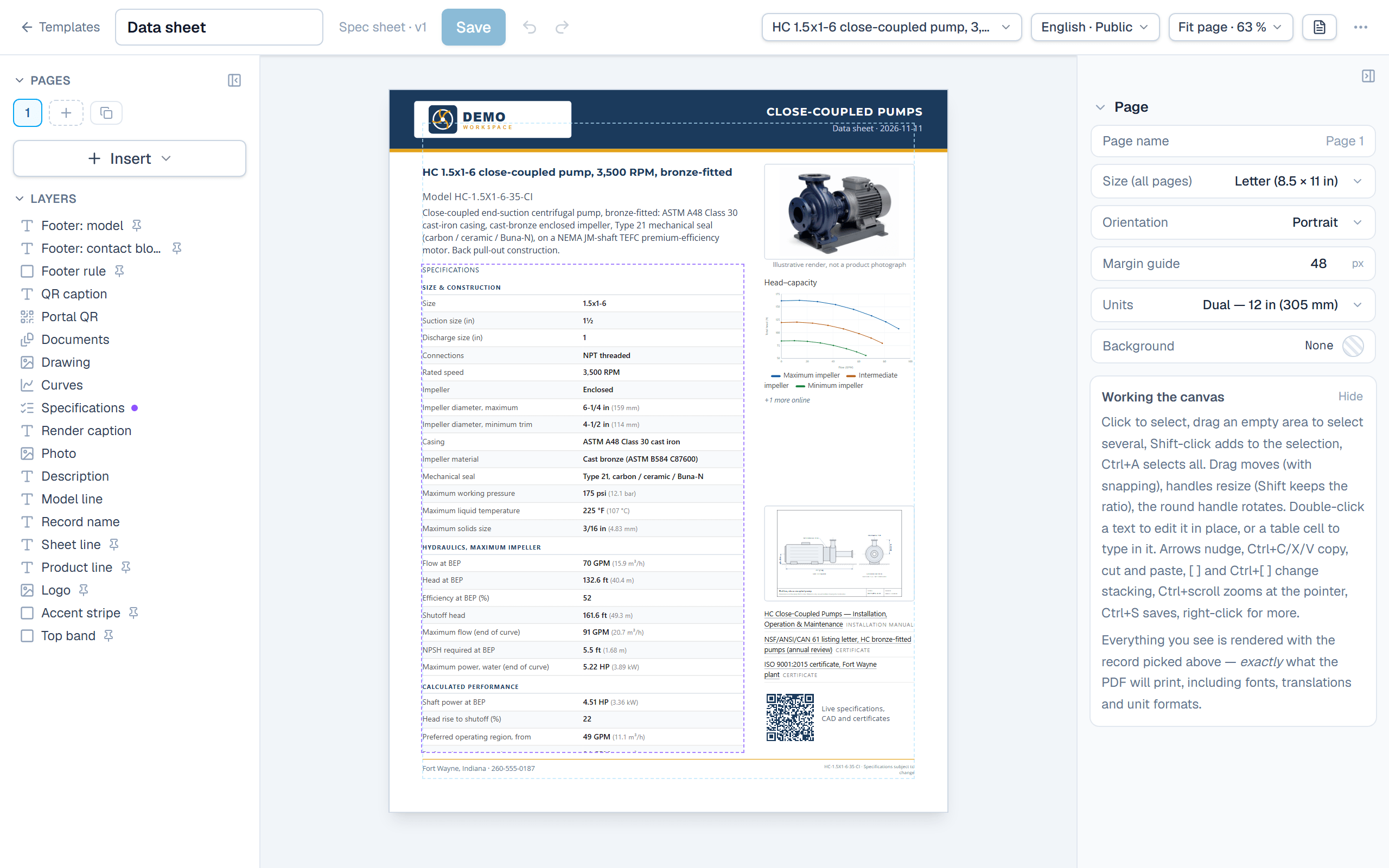
A document is a view of your data. Design the layout once in a drag-and-drop designer, and every record renders its own PDF from live values. When a value changes, the affected PDFs are flagged instead of quietly going stale.
Change a value, and SpecLatch knows which documents it was printed on
Change · stale · regenerate
1 · A value changes
GX-240 · Rated power
1.5 kW (2.0 HP)→2.2 kW (3.0 HP)
Every generated document records the values it was built from.
2 · What was built from it is flagged
- GX-240 spec sheet.pdfStale
- GX Series catalog.pdfStale
- Public product pageUpdated
- GET /api/v1/recordsUpdated
The portal and the API read the record, so they are already right. PDFs are files, so they are flagged.
3 · Regenerated
The regenerated spec sheet shows Rated power 2.2 kW (3.0 HP). Its table runs on to a second page, which ends with “+3 more online”.
When the record is published, by default, or with one click. A long table runs on to a second page; a list that still does not fit ends in “+3 more online” instead of being cut.
A real page designer
Place anything anywhere on the page: text, photos, spec tables, tables of linked records, shapes, QR codes. Use your brand's colors, fonts, and gradients. What you see on the canvas is what prints, because the preview and the PDF use the same renderer.
- Drag-and-drop canvas with grid snapping and alignment guides
- Brand colors, uploaded logos, and a curated set of fonts
- Drop a field on the page and it renders per record
One template, every record's document
Assign a template to a table and each record generates its own spec sheet, on every plan. Multi-page catalogs, from the Growth plan up, add cover pages, tables of contents, and repeating page blocks that lay out a whole product line automatically.
- Spec sheets per record on every plan; catalogs per family or tag from Growth
- Rollups, lookups, curves, and photos print like any other field
- Draft watermarks until a record is published
Stale detection
SpecLatch records which values each document was built from. Change a specification and the affected PDFs are flagged as stale, on the dashboard and on the record, until they are regenerated. In a new workspace a record's spec sheet is regenerated when the record is published, so standing literature stays current without anyone having to remember. The setting can be turned off.
- Change tracking per field against generated output
- A dashboard card listing stale literature
- Regenerated on publish by default, or with one click
Three languages
Field names, select options, and portal text carry translations, so a template renders in English, French, or Spanish from the same record. The French spec sheet is the same data with translated labels. Every plan includes English; Growth adds a second language and Professional includes all of them.
- Document generation per language
- Translated portal interface and field labels
- One source record behind every language
Learn it in the guide
From a record to a PDF, step by step
- Generate a spec sheet PDFPrint one record as a branded PDF from its record page, in the language and visibility you choose.Read it · 10 min
- Design a templateLay out your own spec sheet in the page designer, then assign it to tables so their records print with it.Read it · 8 min
- Documents in other languagesPrint spec sheets and catalogs in French or Spanish from the same templates: translate your labels and texts once, then pick the language when you generate.Read it · 5 min
See it speaking your industry's language
See it on your own catalog
Start a free trial and import one of your own product families. The fastest way to evaluate SpecLatch is on your own data.
30 days of Growth-plan features · no credit card required · your data exports any time